


 English
 русский
Industry News

How Do You Install a Coaxial Connector Properly?
 2026.02.27
 Industry News
Content
Proper Installation of a Coaxial Connector Ensures Maximum Signal Performance
Installing a Coaxial Connector correctly prevents signal loss, interference, and connection failure. A poorly installed connector can reduce signal strength by 20–50%, cause intermittent connectivity, and even damage connected equipment. By following precise stripping, positioning, and crimping steps, you ensure stable signal transmission for TV, internet, CCTV, or RF applications.
Tools Required for Proper Installation
Using the correct tools improves accuracy and minimizes installation errors. Essential tools include:
- Coaxial cable cutter
- Coaxial cable stripper (adjusted for cable type such as RG6 or RG59)
- Compression or crimping tool
- Compatible Coaxial Connector
Precision tools can reduce installation defects by over 30% compared to manual cutting methods.
Step-by-Step Installation Process
Cut the Cable Cleanly
Use a coaxial cutter to create a straight, clean cut. An uneven cut can lead to poor connector seating and increased signal attenuation.
Strip the Cable to Proper Length
Strip approximately 1/4 inch (6 mm) of the outer jacket and expose the dielectric and center conductor according to connector specifications. Avoid cutting or nicking the braided shielding.
Prepare the Shielding
Fold the braided shielding back evenly over the outer jacket. Ensure no strands touch the center conductor, as this may cause a short circuit.
Insert the Coaxial Connector
Push the connector firmly onto the cable until the dielectric is flush with the connector opening. The center conductor should extend about 1–2 mm beyond the connector tip.
Crimp or Compress Securely
Use a compression or crimping tool to lock the connector in place. A properly compressed connector provides a secure mechanical and electrical bond.
Common Installation Mistakes and Their Impact
| Mistake | Resulting Problem | Impact |
|---|---|---|
| Uneven cable cut | Poor connector fit | Signal leakage |
| Damaged shielding | Increased interference | Noise and signal drop |
| Loose crimping | Connector detachment | Intermittent connection |
Attention to detail during installation directly impacts signal reliability and system longevity.
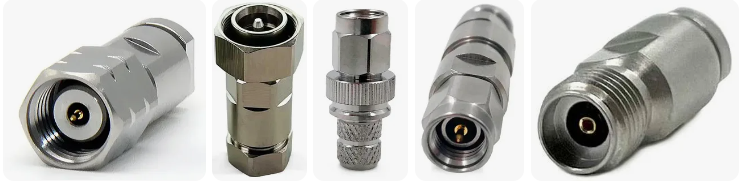
Testing the Installed Coaxial Connector
After installation, test the connection using a cable tester or by verifying signal strength through connected equipment. Proper installation should result in:
- Stable signal transmission
- Minimal signal attenuation
- No visible shielding exposure or shorts
Professional installations often aim for signal loss below 3 dB per connection to maintain optimal performance.
Common Questions About Coaxial Connector Installation
- Q: What type of connector should I use?
A: Choose a connector compatible with your cable type (e.g., RG6 or RG59) and application requirements. - Q: How much center conductor should be exposed?
A: Typically 1–2 mm beyond the connector tip for proper contact. - Q: Can I reuse a coaxial connector?
A: Compression connectors are generally not reusable once installed. - Q: Why is my signal weak after installation?
A: Possible causes include improper stripping, loose crimping, or shielding contact with the center conductor. - Q: Is a compression connector better than a twist-on type?
A: Yes. Compression connectors provide stronger mechanical and electrical connections. - Q: Should I test every installed connector?
A: Yes. Testing ensures signal integrity and prevents future troubleshooting issues.
Looking For Business Opportunity?
Request for a call today
-

+86-15715730755
-

-

No. 1, Longcao Road, Dongqian Lake Tourism Resort Industrial Zone, Yinzhou District, Ningbo City, Zhejiang, China.
Message
Copyright © Ningbo Hanson Communication Technology Co., Ltd.
